Rear Panel (Connecting Your Equipment)
Number | Item | Explanation |
|---|---|---|
| DC IN jack | Connect the included AC adaptor to this jack. Cord hook Secure the cord of the AC adaptor on the cord hook as shown in the illustration. This prevents the plug from getting pulled out and the power getting cut off if you accidentally tug on the cord, and also prevents unnecessary force from being applied to the DC IN jack. |
| [POWER] switch | Turns the power on/off. |
| USB port | USB MEMORY port Connect a USB flash drive (commercially available, maximum of 32 GB) to load audio data or save the settings.
USB COMPUTER port Connect your computer to this port with a USB cable. |
| MIDI connectors | Connect devices that support MIDI input/output to exchange MIDI messages or synchronize the tempo. |
| FOOT SW 1/2 jack | Connect a footswitch (FS-5U, FS-6 or FS-7; sold separately) to trigger the sounds and control other parameters. |
| HH CTRL/EXPRESSION jack | Connect this to a hi-hat pedal (FD-8, FD-9, VH-10 or VH-11; sold separately) to control the hi-hat, or connect an expression pedal (EV-30, sold separately) to control the effect intensity and so on.
|
| TRIGGER IN 1/2, 3/4, 5/6, 7/8 jacks | Connect devices such as external pads (PD series, sold separately) or a kick trigger pedal (KT-10, sold separately) to trigger the sounds.
|
| AUDIO IN | Connect your audio equipment here to sample the input audio or to mix the sound from this unit with the audio. [VOLUME] knob Adjusts the volume of signal inputted to the LINE jack. LINE jack Connect a line-level device here. |
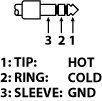
| DIRECT OUT (BALANCED) 1–4 jacks | Connect these to your mixer or other audio equipment. This lets you output only the sound of specified pads. DIRECT OUT jack pin arrangement
|
| MASTER OUT (BALANCED) L/R jacks | Connect these to your amp, speakers, recording equipment and other devices for sound output. MASTER OUT jack pin arrangement
|
| PHONES jack | Connect your headphones here.Use the [PHONES] knob to adjust the volume. |