MASTER
The following are settings that apply to all memories.
Parameter | Value | Explanation |
|---|---|---|
MEM LEVEL | 1–200 | Sets the volume of the memory. |
BPM | 40–250 | Adjusts the BPM value for each memory. BPM (beats per minute) indicates the number of quarter note beats that occur each minute. |
KEY | C (Am)–B (G#m) | This sets the key for the HARMONIST. |
SEAM LEVEL | 0–100 | Adjusts the level of direct sound that’s produced instead of the effect sound, during the silence that occurs when you are switching between memories. |
CARRYOVER | OFF, ON | You can specify whether the effect sound carries over when you switch memories. |
TEMPO HOLD | OFF, ON | Specifies whether the tempo (BPM) changes or stays the same when you switch between memories. |
OUT LEVEL | 1–200 | Adjusts the EX-4 output level.
|
INPUT SET | SET 1-10 | Selects the setting number for the input jack.
|
ALL BYPASS | OFF, ON | While this is ON, the sound of the guitar being input to the EX-4 is outputted without change. All effects will be off. |
NS1:PLACE, NS:PLACE*1 | INPUT, FX1, FX2, FX3, FX4, SEND/RETURN, DIV(A), DIV(B), MIX, OUTPUT | Specifies the NS1 and NS2 position.
|
NS1:SW, NS2:SW*1 | OFF, ON | Turns this effect on/off. |
NS1:DETECT, NS2:DETECT*1 | This controls the noise suppressor based on the volume level for the point specified in Detect. | |
INPUT | Input volume from input jack.
| |
NS INPUT | Noise suppressor input volume.
(Spatial-type effect) | |
NS1:THSHD, NS2:THSHD*1 | 0–100 | Adjust this parameter as appropriate for the volume of the noise. If the noise level is high, a higher setting is appropriate. Adjust the value so that the decay of the guitar sound sounds natural.
|
NS1:RELEASE, NS2:RELEASE*1 | 0–100 | Adjusts the time from when the noise suppressor begins to function until the noise level reaches “0”. |
FV:PLACE | INPUT, FX1, FX2, FX3, FX4, SEND/RETURN, DIV(A), DIV(B), MIX, OUTPUT | Specifies the FV position.
|
FV:POSITION | 0–100 | Adjusts the volume. |
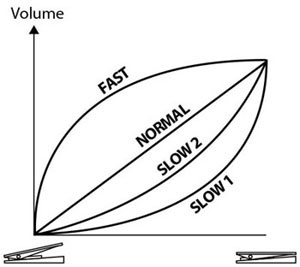
FV:CURVE | SLOW1, SLOW2, NORMAL, FAST | You can select how the actual volume changes relative to the amount the pedal is pressed.
|
FV:MIN | 0–100 | Sets the volume when the heel of the EXP Pedal is depressed. |
FV:MAX | 0–100 | Selects the volume when the toe of the EXP Pedal is depressed. |

- NS2:PLACE–NS2:RELEASE can be configured when the STRUCTURE in CHAIN is set to a value other than SERIAL1.