SEND/RETURN

When the S/R MODE of HARDWARE SETTING is SEND/RETURN, you can connect an external effect unit between the OUTPUT R (SEND) and INPUT R (RETURN) jacks and use it as part of the EX-4 effect.
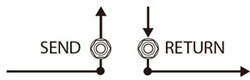
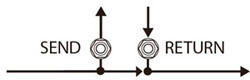
The sound that is input to SEND/RETURN within the effect chain will be output to the SEND jack. The sound that is input via the RETURN jack will be input to SEND/RETURN within the effect chain.
Parameter | Value | Explanation |
|---|---|---|
ON/OFF | OFF, ON | Turns this effect on/off. |
MODE | NORMAL | The input to SEND/RETURN within the effect chain will be output to the SEND jack, and the input from the RETURN jack will be output following SEND/RETURN. Use this setting if you want to connect an external effects processor in series within the EX-4’s effect chain.
|
DIRECT MIX | The input to SEND/RETURN within the effect chain will be output to the SEND jack, and the input from the RETURN jack and the input to SEND/RETURN (the direct sound) will be mixed and output following SEND/RETURN. Use this when you want to mix the EX-4’s effects sounds together with the sound with the external effects device applied to it.
| |
SEND LEVEL | 0–200 | Adjusts the volume of the output to the external effects device. |
RETURN LEVEL | 0–200 | Adjusts the volume of the input from the external effects device. |
ADJUST | OFF, 0–100 | Adjusts the phase between the EX-4’s internal processing and an external effect unit connected to the SEND/RETURN jacks.
|
INVERT | OFF, ON | Inverts the phase of the signal sent from the external effect to the RETURN jack. |