CHORUS


This is an effect that adds a slightly modulated sound to the direct signal, creating beautiful spaciousness and depth.
MONO/STEREO
Parameter | Value | Explanation |
|---|---|---|
ON/OFF | OFF, ON | Turns this effect on/off. |
TYPE | Selection for the chorus mode. | |
MONO
| This chorus effect outputs the same sound from both L channel and R channel. | |
DIR/EFX
| This stereo chorus uses spatial synthesis, with the direct sound output in the L channel and the effect sound output in the R channel. | |
STEREO
| This is a stereo chorus effect that adds different chorus sounds to L channel and R channel. | |
RATE | 0–100, BPMŀ–Ō | Adjusts the rate of the chorus effect.
|
DEPTH | 0–100 | Adjusts the depth of the chorus effect. To use this as a doubling effect, set this to “0”. |
LEVEL | 0–100 | Adjusts the volume of the effect sound. |
PRE-DELAY | 0.0 ms–40.0 ms | Adjusts the time needed for the effect sound to be output after the direct sound has been output. By setting a longer pre delay time, you can obtain an effect that sounds like more than one sound is being played at the same time (doubling effect). |
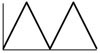
WAVEFORM | TRI | Produces a typical chorus effect.
|
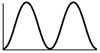
SINE | Produces a deeper sense of modulation.
| |
LOW CUT | FLAT, 20.0 Hz–12.5 kHz | Sets the frequency at which the low cut filter begins to take effect. When “FLAT” is selected, the low cut filter has no effect. |
HIGH CUT | 20.0 Hz–12.5 kHz, FLAT | Sets the frequency at which the high cut filter begins to take effect. When FLAT is selected, the high cut filter has no effect. |
DIRECT | 0–100 | Adjusts the volume of the direct sound. Setting this to “0” cuts the direct sound. |