Selecting a memory
The EX-4 features many different effects.
Each combination of these effects and their settings is called a “memory”.
There are two types of memories on the EX-4: the 128 user memories (U001–U128), which can be overwritten; and the 128 preset memories (P001–P128), which can’t be overwritten.
When shipped from the factory, the user memories of this unit contain the same contents as the preset memories.
- Access the play screen.
- You cannot switch memories while any screen other than the play screen is displayed. If another screen is shown, press the [MENU/EXIT] button to return to the play screen.
- Turn the [SELECT] knob to move the cursor (the white border) to the memory number.
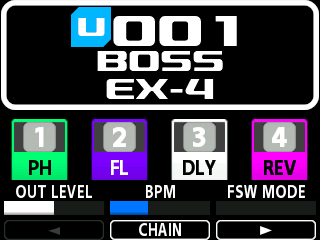
- Turn the [TYPE/VALUE] knob to select a memory.
- When you turn the [TYPE/VALUE] knob while pressing it, you can fast-forward through the memory numbers.
MEMO
Here is another way to recall the memories.
When FSW MODE (footswitch mode) is set to MEMORY (memory mode), press the [É/1] and [ Ç/2] switches to select a memory. At this time, when you press the [É/1] switch to recall the previous memory and then press the [Ç/2] switch, this switches to the next memory.
If you want to set FSW MODE to “MEMORY”, turn the [3] knob while FSW MODE (footswitch mode) is shown on the screen.
You can also press the [É/1] and [Ç/2] switches at the same time to toggle the FSW MODE (footswitch mode).
Indicators when using the “MEMORY” setting
Indicators when using the “MANUAL” setting