Turning effects on/off using the panel buttons
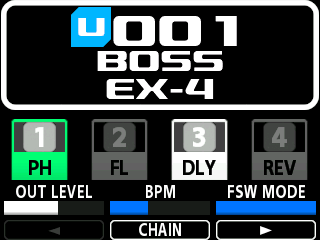
- Press the [FX1]–[FX4] buttons to turn the respective effect blocks on/off.
- Effect blocks that are turned on are lit up onscreen, and effect blocks that are turned off are unlit.
MEMO
When you press one of the [FX1]–[FX4] buttons while the cursor is positioned on an effect block (a white border is shown around one of the FX1–FX4 effects), the cursor moves to the effect block corresponding to the button you pressed.