Changing the effect type of the effect block
- Turn the [SELECT] knob to select the effect block for which you wish to change the effect type.
- A white border is shown around the selected effect block.
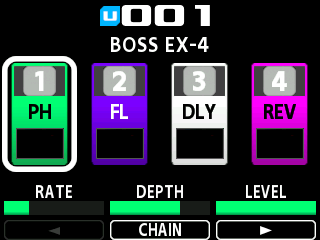
- Press the [TYPE/VALUE] knob.
- The effect type list appears.
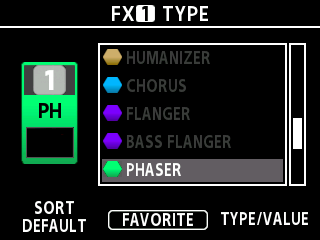
- Turn the [TYPE/VALUE] knob or the [3] knob to select the type.
- Press the [TYPE/VALUE] knob to confirm.
MEMO
By pressing the [2] knob when the effect type list is shown, you can register/deregister your favorite effect types (FAVORITE). The Î mark appears next to the types you register as favorites.
While the list is shown, you can show the list in the order you prefer by turning the [1] knob to change the SORT value.
Value | Explanation |
DEFAULT | In general, the effects are shown in the order in which they are connected (dynamics -> pitch -> modeling -> distortion -> filter -> modulation -> reverb). |
ABC | Lists the effects in alphabetical order. |
BSS/GTR | The effects that include bass guitar types and subtypes are shown at the top, based on the default order. |
FAVORITE | The registered favorites are listed first, based on the default order. |
MEMO
After you turn the [SELECT] knob to select an effect block, you can also turn the [TYPE/VALUE] knob to change the effect type.