Recalling recommended settings for each effect (GEAR SUITE)
The EX-4 features several recommended settings for each effect type. The function used for easily recalling these settings is called “GEAR SUITE”.
You can use this function to easily create sounds by combining settings for each effect, without having to make detailed adjustments to each effect’s parameters.
MEMO
Each effect type features a number of presets (GEAR SUITE P01–) configured by a pro guitarist who knows all about the characteristics of these effects. You can recall these settings simply by turning the knob. You can’t overwrite these presets.
To use new settings in GEAR SUITE, save them as user settings (GEAR SUITE U01–).
- Turn the [SELECT] knob to select the effect block.
- A white border is shown around the selected effect block.
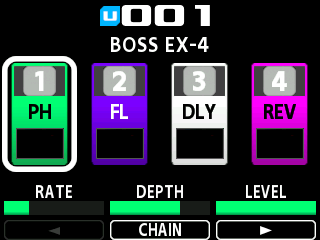
- Press the [GEAR SUITE] button.
- A list of recommended settings that are saved for the selected effect block type (such as PHASER for the FX1 block, as shown in the image) is shown.
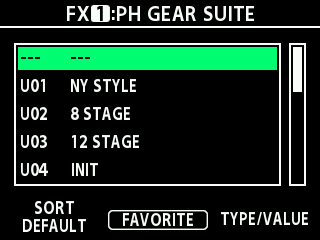
- Turn the [SELECT] knob to select the settings you like from the list.
MEMO
Press the [2] knob to register or deregister your favorites. The Î mark appears next to the items you register as favorites.
You can change the SORT value by turning the [1] knob to show the list in the order you prefer.
Value | Explanation |
|---|---|
DEFAULT | Shows the USER items first, then the PRESET items. |
FAVORITE | The registered favorites are listed first, based on the default order. |