Assigning functions
ASSIGN gives you the freedom to set which controller (source) controls which parameter (target). Up to eight patterns of these combinations can be set in the ASSIGN1–ASSIGN8 slots.
- Press the [MENU/EXIT] button on the play screen.
- Turn the [SELECT] knob to move the cursor to the row containing “ASSIGN”.
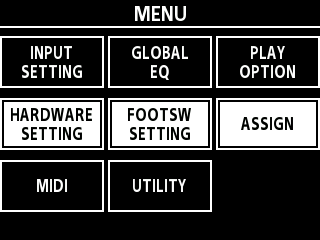
- Press the [3] knob to open the ASSIGN screen.
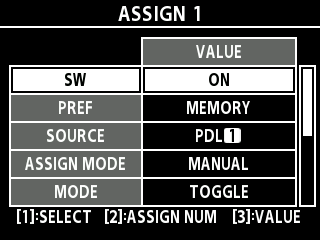
- Turn the [2] knob to select the assign number.
- You can set up to eight assignments, from ASSIGN 1 to ASSIGN 8.
- Use the following operation to change the settings.

Operation
Explanation
Turn the [SELECT] knob or the [1] knob
Moves the cursor.
Turn the [TYPE/VALUE] knob or the [3] knob
Changes the value.
- For details on the functions that can be assigned, refer to the “EX-4 Parameter Guide” (BOSS website).
- Press the [MENU/EXIT] button a number of times to return to the play screen.