Assigning the preset settings
You can easily assign functions that are already provided (the preset settings) to the controller that you want.
- Press the [MENU/EXIT] button on the play screen.
- Turn the [SELECT] knob to move the cursor to the row containing “ASSIGN”.
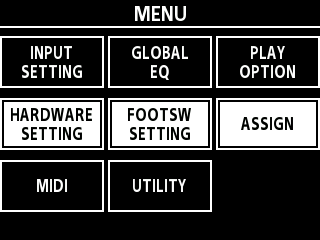
- Press the [3] knob to open the ASSIGN screen.
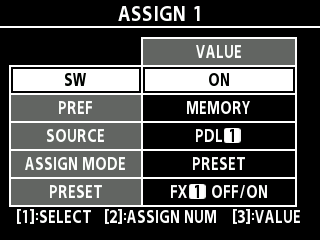
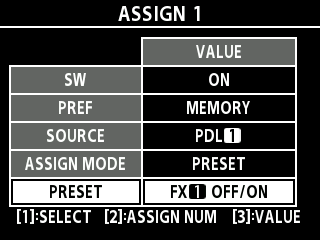
- Turn the [SELECT] knob or the [1] knob to move the cursor to SOURCE.
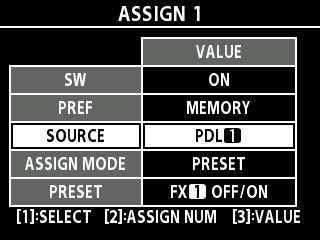
- Turn the [TYPE/VALUE] knob or the [3] knob to set the source.
- This assigns the function to the controller you’ve selected here.
MEMO
When the cursor is on SOURCE and you press the footswitch ([É/1] [Ç/2] switches or a connected external pedal switch) to set, you can set that as the source. Check whether the switch you pressed is correctly applied to the VALUE of the SOURCE.
- Set the ASSIGN MODE to PRESET.
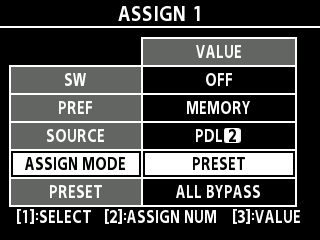
- Select the preset setting that you want.
MEMO
For details on the functions that can be assigned for the presets, refer to the “EX-4 Parameter Guide” (BOSS website).
To configure the detailed settings of the function you assigned without using the preset settings, select MANUAL for the ASSIGN MODE and edit the various values. For details on the functions that can be assigned, refer to the “EX-4 Parameter Guide” (BOSS website).
You can assign the parameters that are shown in the CHAIN screen or in the parameter edit screen.ØSetting the edit screen parameters as the ASSIGN target