Restoring the factory settings (factory reset)
Restoring the EX-4 to its original factory settings is referred to as “factory reset”. You can restore all of the settings to their factory-set values, and you can also specify certain items to be reset.
- When you execute a factory reset, the memories you saved and the settings you made are lost. Save the data you need to your computer, mobile device or other storage.
- Select [MENU/EXIT] Ó “UTILITY” Ó “FACTORY RESET”.
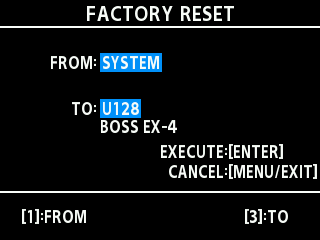
- Specify the factory reset range by turning the [1] and [3] knobs to set “FROM” and “TO”.

Knob
Parameter
Value
Explanation
[1]
[3]
FROM
TO
SYSTEM
System parameter settings
GEAR SUITE
GEAR SUITE parameter settings
U001–U128
Settings for memory numbers U001–U128
- Press the [TYPE/VALUE] knob.
- A confirmation message appears.
- To cancel the factory reset, press the [MENU/EXIT] button or use the knob to select “CANCEL” and press the [TYPE/VALUE] knob.
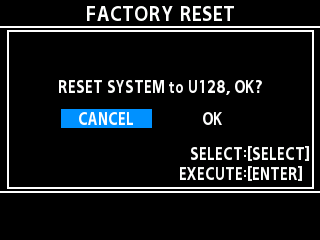
- To execute the factory reset, use the [SELECT] knob to select “OK”, and press the [TYPE/VALUE] knob.
- Once the factory reset is complete, the unit returns to the play screen.