Editing while viewing all parameters
- Long-press one of the [FX1]–[FX4] buttons corresponding to the block you want to edit.
- This shows the list of parameters for the block that you long-pressed.
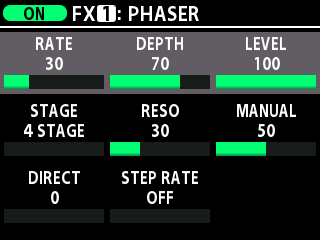
- Turn the [SELECT] knob to move the cursor to the parameter that you want to edit.
- Turn the [1]–[3] knobs to change the values for the parameters.
MEMO
To list the parameters of an MST (master) or S/R (send/return) block, select the blocks in the chain screen and long-press the [TYPE/VALUE] knob.