Disabling simultaneous presses of the footswitches on this unit
With the default settings, the FSW mode switches when you press the [É/1] and [Ç/2] switches at the same time. However, when you change the É & Ç parameter values on the FOOTSWITCH SETTING screen, you can disable the function for simultaneously pressing the footswitches.
- Select [MENU/EXIT] Ó “FOOTSW SETTING”.
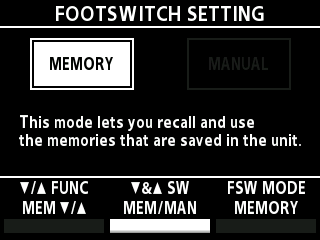
- Turn the [2] knob to edit the “É & Ç SW” parameter.
Value | Explanation |
|---|---|
MEM/MAN | Each time you press the [É/1] and [Ç/2] switches at the same time, the unit toggles between memory mode and manual mode. |
OFF | Pressing the [É/1] and [Ç/2] switches at the same time does not toggle between memory mode and manual mode. |