HARMONIST
 HEXARAY: Level meter
Harmonist is an effect where the amount of shifting is adjusted according to an analysis of the guitar input, allowing you to create harmony based on diatonic scales.
- Because of the need to analyze the pitch, chords (two or more sounds played simultaneously) cannot be played. Be sure to mute all the other strings and play only one note at a time.
- When you are to play the next string while a certain sound is still playing, mute the previous sound and then play the next one with a clear attack. If the unit cannot detect the attack, it may not sound correctly.
- The sensitivity may vary according to the guitar’s TONE knob and pickup type.
Parameter | Value | Explanation |
|---|---|---|
ON/OFF | OFF, ON | Turns this effect on/off. |
HARMONY | -2oct–+2oct | This determines the pitch of the sound added to the input sound, when you are making a harmony. It allows you to set it by up to 2 octaves higher or lower than the input sound. |
+1oct&-1oct, -4th&-6th, | Outputs a two-note harmony sound. | |
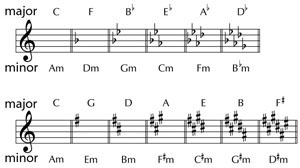
KEY | C (Am)–B (G#m) | The key setting corresponds to the key of the song (#, b) as follows.
|
LEVEL | 0–100 | Adjusts the volume of the harmony sound. |
PRE-DELAY | 0–300 ms, BPM ŀ–Ō | Adjusts the time from when the direct sound is heard until the harmonist sounds are heard. Normally you can leave this set at 0 ms.
|
FEEDBACK | 0–100 | Adjusts the feedback amount of the harmonist sound. |
DIRECT | 0–100 | Adjusts the volume of the direct sound. |