CTL FUNC (CONTROL FUNCTION)
Here’s how to configure the parameters for operating all of the footswitches on the top panel, the expression pedal (EXP1), the CTL 2, 3/EXP2 jack on the rear panel and the EV-1-WL/FS-1-WL.
- Press the [MENU] button.
- Turn the [1] knob to move the cursor to the CTL FUNC row.
- Press the [1] knob.
- The CTL FUNC screen appears.
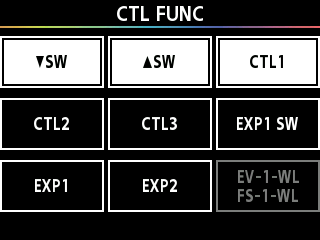
- Turn the [1] knob to move the cursor to the row of the controller you want to configure.
- Press the [1]–[3] knobs to enter the settings screen for the controller you want to configure.
- Turn the [1] knob to move the cursor, and turn the [3] knob to set the value.
- Press the [å] [ä] buttons to switch between the controllers to configure.