Setting the type of amp to connect (OUTPUT SELECT)
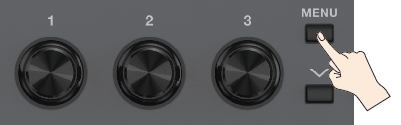
- Press the [MENU] button.
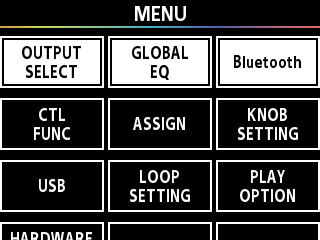
- Press the [å] [ä] buttons to move the cursor to the “OUTPUT SELECT” row.
- Press the [1] knob to select “OUTPUT SELECT”.
- Turn knob [1] to select the type of amp.
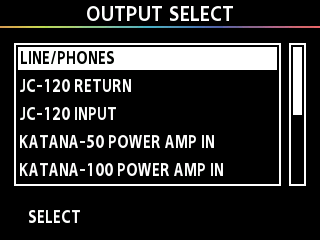
Value | Explanation |
|---|---|
LINE/PHONES | Choose this setting if you’re using headphones, or if the GX-1 is connected to a keyboard amp, mixer, or digital recorder. |
JC-120 RETURN | Use this setting when connecting to the return jack of a Roland JC-120 guitar amp. |
JC-120 INPUT | Use this setting when connecting to the guitar input jack of a Roland JC-120 guitar amp. |
KATANA-50 POWER AMP IN | Use this setting when connecting to the POWER AMP IN jack of a BOSS KATANA-50 guitar amp. |
KATANA-100 POWER AMP IN | Use this setting when connecting to the POWER AMP IN jack of a BOSS KATANA-100 guitar amp. |
SMALL AMP | Use this setting when connecting to a small guitar amp. |
COMBO SPx2 RETURN | Use this setting when connecting to the RETURN of a combo amp (in which the amp and speakers are in a single unit) equipped with two speakers. |
COMBO SPx2 INPUT | Use this setting when connecting to the INPUT of a combo amp (in which the amp and speakers are in a single unit) equipped with two speakers. |
STACK SPx4 RETURN | Use this setting when connecting to the RETURN of a stack-type guitar amp (in which the amp and speakers are separate units). |
STACK SPx4 INPUT | Use this setting when connecting to the input of a stack-type guitar amp (in which the amp and speakers are separate units). |