Making the effect sound (reverberations) carry over when you switch memories (carryover)
The function that preserves the tail of an effect (such as delay or reverb) when you switch to a different effect is called “carryover”.
- Press the [EDIT] button.
- The effect chain screen is shown.
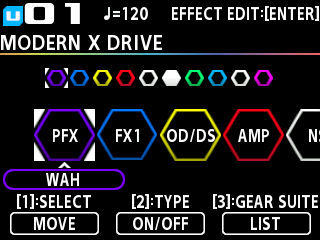
- Turn the [1] knob to select the MASTER block (MST).
- Press the [ENTER] button.
- The edit screen appears.
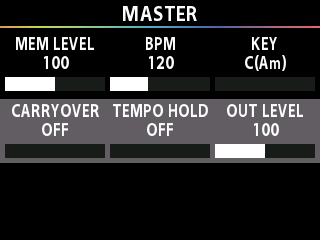
- Press the [å] [ä] buttons to move the cursor to the “CARRY OVER” row.
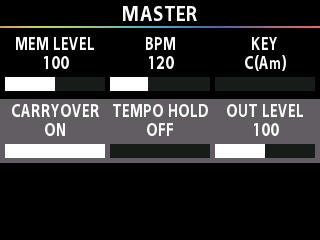
- Turn the [1] knob to set the CARRY OVER parameter to “ON”.
Conditions in which carryover is enabled
To enable the carryover of the delay or reverb (included in the memory that you used before switching) after you’ve switched to a different memory, make the following settings.
- On the preceding and on the following memories, configure the effect chain to use the same effect, and use the same arrangement. Set each effect type to be the same as well.
- On each memory, change the effect parameter settings and the on/off settings.
MEMO
The carryover sound, such as delay and reverb, changes according to the settings in the memory after switching. For a natural effect, we recommend that you use the same settings as the memory before switching.