Assigning the desired parameters to knobs [1]–[3] (KNOB SETTING)
Here’s how to assign the parameters that are controlled by the [1]–[3] knobs when the play screen is shown.
- Press the [MENU] button.
- Press the [å] [ä] buttons to move the cursor to the “KNOB SETTING” row.
- Press the [3] knob.
- The KNOB SETTING screen appears.
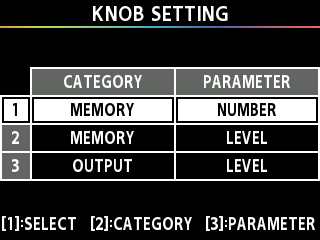
- Turn the [1] knob to select the knob you want to set.
- The highlight moves up and down.
- Turn the [2] knob to select the category.
- Turn the [3] knob to change the parameter to assign.