Setting the colors for the display and footswitches
This function includes the settings for the colors of the display and the LED indicators.
These parameters are common settings for all memories.
- Press the [MENU] button.
- Press the [å] [ä] buttons to move the cursor to the “HARDWARE SETTING” row.
- Press the [1] knob.
- The HARDWARE SETTING screen appears.
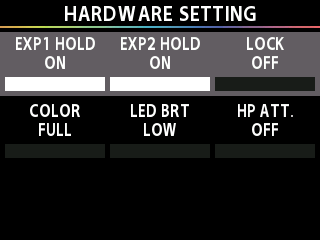
- Press the [å] [ä] buttons to move the cursor to the “COLOR” row.
- Turn the [1] knob to select the color display setting.
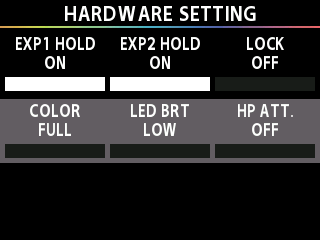
Value | Explanation |
|---|---|
FULL | The screen displays in color. The LED indicator colors change depending on the effect type and so on. |
RED | The screen displays in black and white. The LED indicators basically display in red. When a function is used for which the color change is necessary, the colors yellow, blue and white are used to make the state easy to distinguish. |
BLUE | The screen displays in black and white. The LED indicators basically display in blue. When a function is used for which the color change is necessary, the colors red, yellow and white are used to make the state easy to distinguish. |
GREEN | The screen displays in black and white. The LED indicators basically display in green. When a function is used for which the color change is necessary, the colors red, yellow, blue and white are used to make the state easy to distinguish. |
YELLOW | The screen displays in black and white. The LED indicators basically display in yellow. When a function is used for which the color change is necessary, the colors red, blue and white are used to make the state easy to distinguish. |
ORANGE | The screen displays in black and white. The LED indicators basically display in orange. When a function is used for which the color change is necessary, the colors red, yellow, blue and white are used to make the state easy to distinguish. |
PINK | The screen displays in black and white. The LED indicators basically display in pink. When a function is used for which the color change is necessary, the colors red, yellow, blue and white are used to make the state easy to distinguish. |
PURPLE | The screen displays in black and white. The LED indicators basically display in purple. When a function is used for which the color change is necessary, the colors red, yellow, blue and white are used to make the state easy to distinguish. |
LIGHT BLUE | The screen displays in black and white. The LED indicators basically display in light blue. When a function is used for which the color change is necessary, the colors red, yellow, blue and white are used to make the state easy to distinguish. |
CYAN | The screen displays in black and white. The LED indicators basically display in cyan. When a function is used for which the color change is necessary, the colors red, yellow, blue and white are used to make the state easy to distinguish. |
WHITE | The screen displays in black and white. The LED indicators basically display in white. When a function is used for which the color change is necessary, the colors red, yellow and blue are used to make the state easy to distinguish. |