Listening to sound from a wirelessly connected mobile device (Bluetooth® audio)
Bluetooth® audio functionality
You can output music played from your Bluetooth audio-capable mobile device from the OUTPUT jacks or the PHONES jack of the GX-1.
Registering a Mobile Device (Pairing)
“Pairing” involves registering the mobile device that you want to use with the GX-1 (making the two devices recognize each other).
Here we’ll configure the settings so that music data saved on your mobile device can be played wirelessly via the GX-1.
MEMO
The following explanation is only one example. For details, refer to the owner’s manual of your mobile device.
- Turn on the power of the GX-1.
- Place the mobile device that you want to connect close to the GX-1.
- Press the [MENU] button.
- Press the [å] [ä] buttons to move the cursor to the “Bluetooth” row.
- Press the [3] knob.
- The Bluetooth screen appears.
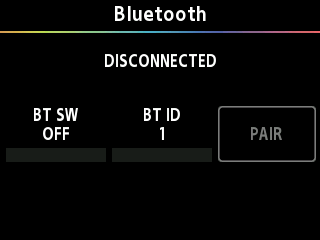
- Turn the [1] knob to turn the BT SW on.
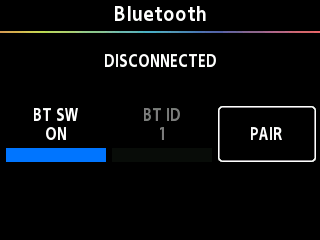
- Press the [3] knob (PAIR) to activate pairing standby mode.
- The screen of the GX-1 shows “Pairing”.
- If you don’t pair the unit within a certain amount of time, pairing standby mode is canceled.
- Turn on the Bluetooth function of the mobile device.
- Tap “GX-1 Audio”, shown on the Bluetooth device screen of your mobile device.
- This pairs the GX-1 with your mobile device. When pairing succeeds, “GX-1 Audio” is added to the list of paired devices on your mobile device.
- AUDIO: À is shown on the GX-1 display.
MEMO
If you turn the [1] knob and set BT SW to “OFF” while Bluetooth is connected, the connection is temporarily severed.
Set BT SW to “ON” to reconnect. When unpairing, delete the registration data on your mobile device.