Controlling the unit from a mobile device app
Use the “BOSS TONE STUDIO for GX-1” app to edit effects and save settings on this unit.
For details on the BOSS TONE STUDIO for GX-1, see the BOSS website.
https://www.boss.info/support/
Connecting to the App
- Make the connection from the app’s settings, not from your mobile device’s Bluetooth settings.
- Turn on the power of the GX-1.
- Place the mobile device that you want to connect close to the GX-1.
- Turn on the Bluetooth function of the mobile device.
- Press the [MENU] button.
- Press the [å] [ä] buttons to move the cursor to the “Bluetooth” row.
- Press the [3] knob.
- The Bluetooth screen appears.
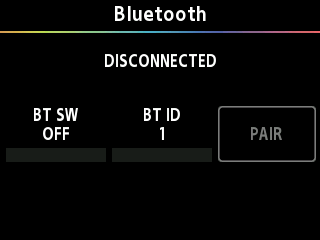
- Turn the [1] knob to turn the BT SW on.
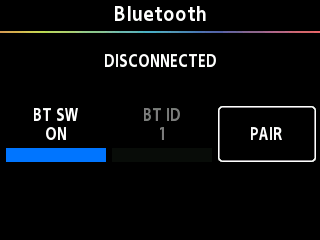
- In the app’s settings, connect to GX-1 MIDI.
- Once the connection is complete, MIDI:À is displayed on the GX-1 screen.
NOTE
Do not tap “GX-1 MIDI” if you see it in the Bluetooth settings of your mobile device. If you tapped this, temporarily cancel the device registration, and perform the procedure again from step 3.