Setting example 2: assigning the PEDAL FX ON/OFF switch to the EXP1 switch, and the PEDAL FX control to EXP1
The EXP1 switch is activated when you press down hard on the toe of the [EXP1] pedal.
When you’ve finished making the settings, you can control the following.
- When PEDAL FX is off, you can operate the [EXP1] pedal to control the foot volume.
- When you strongly press the toe of the [EXP1] pedal, PEDAL FX turns on, and you can operate the [EXP1] pedal to control the PEDAL FX effect. When PEDAL FX is set to WAH, you can operate the [EXP1] pedal to adjust the wah depth.
MEMO
To change the PEDAL FX effect, you must make separate settings. Refer to Basic procedure for effect editing.
- Press the [MENU] button.
- Press the [å] [ä] buttons to move the cursor to the “CTL FUNC” row.
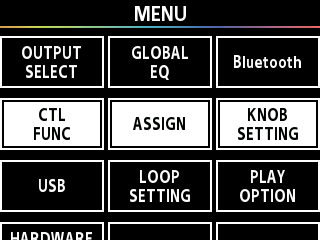
- Press the [1] knob.
- Use the [1]–[3] knobs or the [å] [ä] buttons to move the cursor to the “EXP1 SW” row.
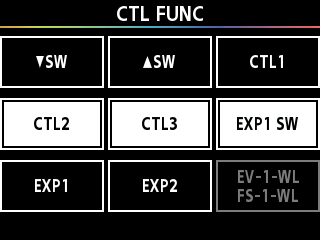
- Press the [3] knob.
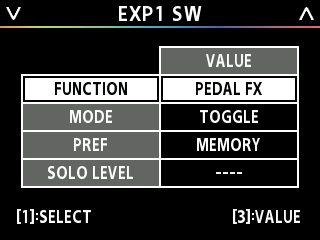
- The EXP1 SW settings screen appears.
- Turn the [1] knob to move the cursor to “FUNCTION”, and turn the [3] knob to set the VALUE to “PEDAL FX”.
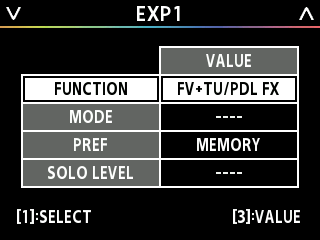
- Press the [å] [ä] buttons to open the EXP1 settings screen.
- Turn the [3] knob to set the FUNCTION to “FV+TU/PDL FX”.