Assigning effects to BUS 1 and BUS 2
Here’s how to assign the built-in effects of this unit to BUS 1 or BUS 2. You can use two types of effects separately.
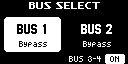
- Press the [BUS FX] button to select the bus to configure.
- When the button is lit orange, BUS 1 is selected; and when the button is blinking orange, BUS 2 is selected.
- Press the [FILTER+DRIVE]–[MFX] buttons to select the effect to assign to the bus.
MEMO
- You can assign the built-in effects of this unit to BUS 3 or BUS 4. Up to four effects are available.
To assign an effect to BUS 3 or BUS 4, change the settings in the effect setting screen.
→ “Configuring the effect settings (EFX SET)” - When you set BUS 1 and BUS 2 to the same effect, the message “Same EFX on other BUS” is shown.