Using the MFX effects
You can use the [MFX] button to quickly and flexibly switch between the many built-in effects.
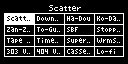
- While holding down the [MFX] button, turn the [VALUE] knob or the [CTRL 3] knob to select the effect to use.
MEMO
- You can also use pads [1]–[16] instead of the [VALUE] knob or the [CTRL 3] knob to select an effect.
- To use pads [1]–[16] to select effects from #17 and up, hold down the [MFX] button and press the [DJFX LOOPER] button.
- To use pads [1]–[16] to select effects from #33 and up, hold down the [MFX] button and press the [ISOLATOR] button.
- After selecting the effect, take your finger off the [MFX] button.
- The effect turns on, and the effect edit screen appears.
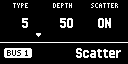
- Use the [CTRL 1]–[CTRL 3] knobs to operate the parameters.
MEMO
- Turn the [CTRL 1]–[CTRL 3] knobs while holding down the [VALUE] knob to operate the sub-parameters of the effect.