Using effects with BUS 3, BUS 4 (FAVORITE)
To use effects on BUS 3 or BUS 4, set the value of “FAVORITE” in “FAVORITE” (EFX SETTING screen) to a value (1–16) other than “Bypass”.
The effects assigned to BUS 3 and BUS 4 as well as the parameters are saved to FAVORITE 1–16, and can be selected regardless of the project.
- Hold down the [SHIFT] button and press the pad [13].
- The UTILITY MENU screen appears.
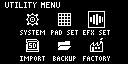
- Use the [VALUE] knob to select “EFX SET” and press the [VALUE] knob.
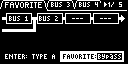
- The effect setting screen appears.
MEMO
- From the top screen, you can also make this screen appear by pressing pad [16] while holding down the [SHIFT] button.
- Turn the [CTRL 3] knob to select “FAVORITE”.
- Turn the [VALUE] knob to select “FAVORITE 1” through “FAVORITE 16”.
- The BUS 3 and BUS 4 effects turn on according to the settings in each favorite, and can be edited.
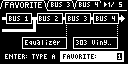
- When you select “Bypass”, the BUS 3 and BUS 4 effects are disabled.
- To finish making settings, press the [EXIT] button.
MEMO
- In modes such as sample mode, press the [BUS FX] button while holding down the [VALUE] knob to turn the BUS 3 and BUS 4 effects off. This operation has no effect on the “FAVORITE” parameter values.