Renaming the drum kit (KIT NAME)
Here’s how to rename the currently selected drum kit.
- Press the [MENU] button.
- Use the cursor buttons to select “KIT OPTIONS” Ó “KIT NAME”, and press the [ENTER] button.
- The KIT NAME screen appears.
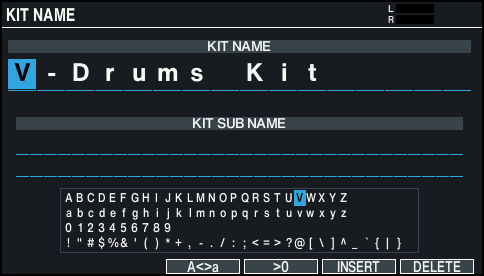
- Edit the name.
- You can enter a kit name (upper line) of up to 16 characters, and a sub-name (lower line) of up to 64 characters.

Controller
Explanation
Cursor buttons
Moves the cursor to the character that you want to change.
Dial
Edits the character.
[F3] (Açæa) button
Toggles between uppercase/lowercase.
[F4] (æ0) button
Selects numerical input.
[F5] (INSERT) button
Inserts a space at the cursor position.
[F6] (DELETE) button
Deletes the character at the cursor position.
- Press the [KIT] button to return to the KIT screen.