Controlling tonal change (POS/PEDAL)
You can use a pedal to change the pitch, or to adjust the tone based on the pad position.
ØFor details on the parameters that can be edited, refer to “Data List” (Roland website).
- Press the [MENU] button.
- Use the cursor buttons to select “KIT OPTIONS” Ó “POS/PEDAL”, and press the [ENTER] button.
- Press the function buttons to access the respective settings screens.

Screen
Explanation
PAD POSITION screen (*1)
Turns on/off tonal changes that occur depending on your strike location or the nuances of your rim shots.
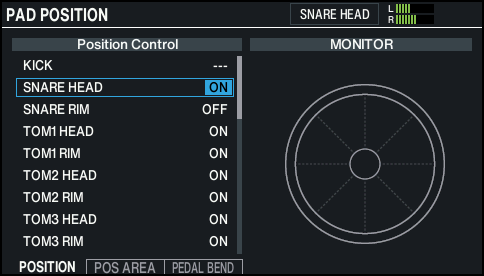
POSITION AREA screen (*1)
Sets the strike area for the head, rim and so on.
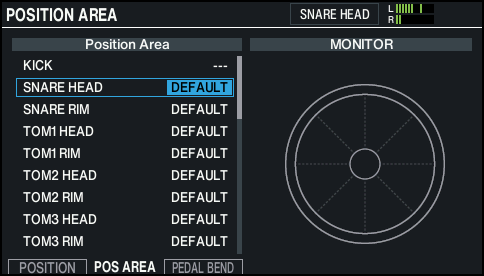
PEDAL BEND screen
Specifies the amount of pitch change that occurs according to how deeply you press the hi-hat pedal.
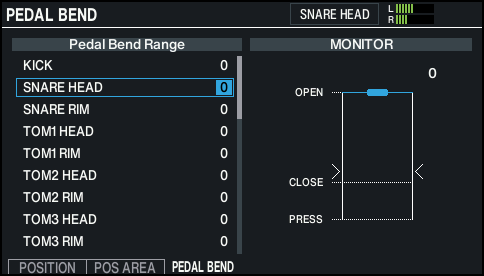
- *1: This supports the following trigger inputs.
- SNARE
- TOM1–3
- HI-HAT (only when a VH-14D is assigned to the hi-hat trigger input)
- Bow (head) of RIDE, edge (rim)
- AUX
- * This may not have any effect, depending on the pad that is connected or the instrument selected.
- Select the pad to configure.
- Ø “Selecting the pad to set”
- Use the cursor buttons to select a parameter, and use the dial to edit the value.
- Press the [KIT] button to return to the KIT screen.