Tuning
You can tune the heads and choose the size of the cymbals.
- Press the [EZ EDIT] button.
- Press the [F2] (TUNING) button.
- The EZ EDIT - TUNING screen appears.
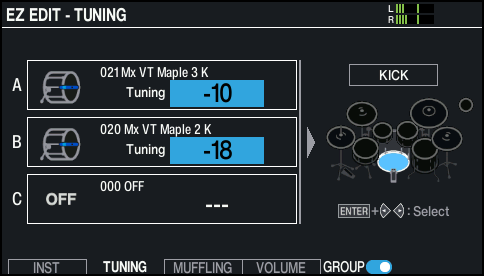
- Select the pad to configure.
- Ø “Selecting the pad to set”
- Use the dial to change the value.
MEMO
- By pressing the [F5] (GROUP) button, you can set the instruments (layers A–C) either as a set (on) or individually (off).
- Press the [F6] (UNDO) button to return to the settings you had when you first accessed the screen.
- Press the [KIT] button to return to the KIT screen.