Making detailed edits to a drum kit (KIT EDIT)
You can make detailed edits to a drum kit, such as setting the volume for each instrument and pad and so forth.
ØFor details on the parameters that can be edited, refer to “Data List” (Roland website).
- Press the [MENU] button.
- Use the cursor button to select “KIT EDIT”.
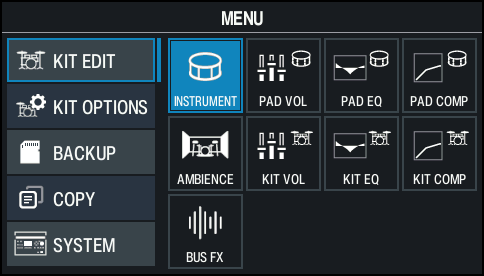
 Use the cursor buttons or the dial to select the menu that you want to edit, and press the [ENTER] button.
Menu
Explanation
INSTRUMENT
Edits the instruments.
PAD VOL
Sets the volume and pan (stereo position) for each pad.
PAD EQ
Adjusts the tonal character (pad equalizer) for each pad.
PAD COMP
This sets the changes in volume or dynamics (pad compressor) of each pad.
AMBIENCE
Simulates the reverberation and resonance of the location in which you’re playing the drums.
KIT VOL
Sets the volume of the drum kit, the hi-hat and so on.
KIT EQ
Sets the tonal character (kit equalizer) for the entire drum kit, on a kit-by-kit basis.
KIT COMP
Sets the volume changes (kit compressor) for the entire drum kit, on a kit-by-kit basis.
BUS FX
Lets you apply a variety of effects to each pad.
- Edit the settings according to the selected menu.
- Press the [KIT] button to return to the KIT screen.
Additional information
- Editing Instruments (INSTRUMENT)
- Setting the pad volume and pan (PAD VOL)
- Adjusting the tonal character of each pad (PAD EQ)
- Adjusting the volume change of each pad (PAD COMP)
- Recreating the reverberations of a performance location (AMBIENCE)
- Setting the drum kit volume (KIT VOL)
- Adjusting the tonal character of the drum kit (KIT EQ)
- Adjusting the changes in volume of a drum kit (KIT COMP)
- Adding effects (BUS FX)