Using a virtual pad
In addition to the pads connected to the TRIGGER IN jacks, the V31 also has “virtual pads” that can play sounds when MIDI note numbers are received.
You can edit the virtual pad settings by showing the virtual pads on the screen.
MEMO
- The virtual pads are assigned to the AUX/TOM4 (*1) and AUX2–4 pads.
*1: When the Trigger Input AUX/TOM4 Select setting is “AUX”, TOM4 is used as a virtual pad, and when the Trigger Input AUX/TOM4 Select setting is “TOM4”, AUX is used as a virtual pad. - You can set the MIDI note numbers in KIT MIDI.
- Ø “Making MIDI transmit/receive settings for each pad (KIT MIDI)”
- The parameters you set for the virtual pads are included in the kit backup data. This data can be read by the V71 and the V51.
- Press the [MENU] button.
- Use the cursor buttons to select “SYSTEM” Ó “OPTION”, and press the [ENTER] button.
- The OPTION screen appears.
- Press the [F4] (UI CUSTOM) button.
- The OPTION - UI CUSTOM screen appears.
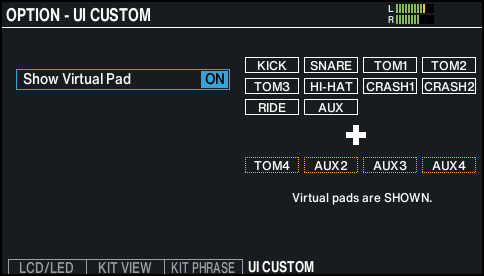
- Use the dial to set the value to “ON”.
- This activates the screen display of the virtual pads.
- Use KIT EDIT to configure the virtual pads.
Example: VOLUME/PAN screen when the virtual pads are on
The virtual pads in each settings screen are indicated by an orange border.