Configuring the routing for USB audio (ROUTING)
This shows you how to configure the routing for the USB audio input/output.
Use this to directly input the sound from your computer to the pads of the V31, or to limit the sounds sent from the V31 to your computer.
The standard setting is “NORMAL”.
MEMO
This is enabled when the Driver Mode is “VENDOR”.
NORMAL
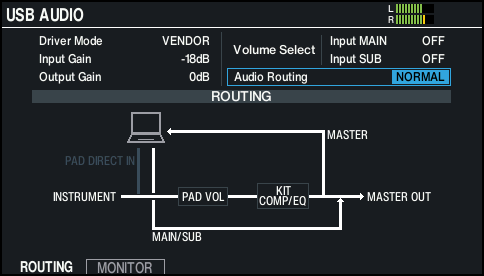
V31 Ó computer: MASTER OUT, direct output of each pad
Computer Ó V31: MAIN, SUB
PAD DIRECT IN
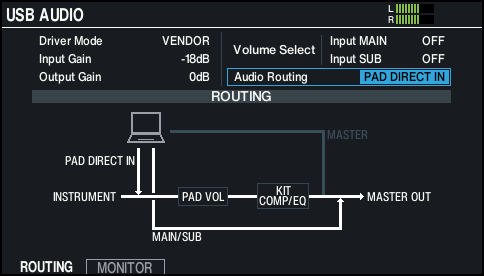
V31 Ó computer: All USB audio output from the V31 is muted.
Computer Ó V31: MAIN, SUB, direct input to each pad
LOOPBACK
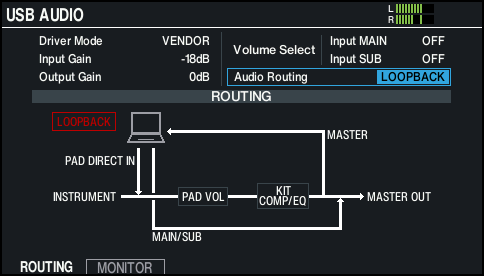
V31 Ó computer: MASTER OUT, direct output of each pad
Computer Ó V31: MAIN, SUB, direct input to each pad
- A dialog box appears when you use the “LOOPBACK” setting.
NOTE
Use caution with the LOOPBACK setting, as the USB audio input and output may be inadvertently connected depending on the settings of your computer, the DAW to which you’re connecting or the V31. This may result in a loud noise (loopback).
Audio routing I/O chart
| Audio Routing | ||
|---|---|---|---|
NORMAL | PAD DIRECT IN | LOOPBACK | |
V31Ócomputer | |||
MASTER OUT | µ | Muted | µ |
Direct output of each pad | µ | Muted | µ |
ComputerÓV31 | |||
INPUT MAIN/SUB | µ | µ | µ |
PAD DIRECT IN | Muted | µ | µ |