Making overall settings for the V31 (SYSTEM)
Here’s how to configure settings that are common to the entire V31, such as specifying the output destination of the V31, and making trigger settings.
- Press the [MENU] button.
- Use the cursor buttons to select “SYSTEM”.
- The SETUP screen appears.
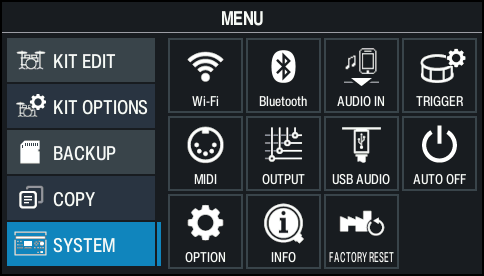
- Use the cursor buttons or the dial to select the menu that you want to edit, and press the [ENTER] button.

Menu
Explanation
Wi-Fi
Lets you connect the V31 to the Roland Cloud Connect app via Wi-Fi.
ØRefer to the “Roland Cloud Connect Setup Guide” (separate document).
Bluetooth
Configures the Bluetooth settings.
AUDIO IN
Sets the input volumes for the MIX IN jack and Bluetooth audio.
TRIGGER
Configures the trigger settings.
Ø “Trigger settings”
MIDI
Configures the overall MIDI-related settings for the V31.
OUTPUT
Specifies the output destination of the sounds.
USB AUDIO
Makes the USB audio settings.
AUTO OFF
Changes the Auto Off setting.
Ø “Making the power automatically turn off after a time (AUTO OFF)”
OPTION
Configures the display, kit phrase and other settings.
INFO
Used for checking how much memory is free on this unit, as well as the system program version.
FACTORY RESET
Restores the factory settings.
- Edit the settings according to the selected menu.