Playing along with the songs on the V51
This unit features songs in a variety of genres.
Some of the built-in songs are provided as audio data, and others are MIDI data recordings of drum performances. You can also play audio files (WAV/MP3) stored on an SD card as songs.
- Press the [SONG] button.
- The SONG screen appears.
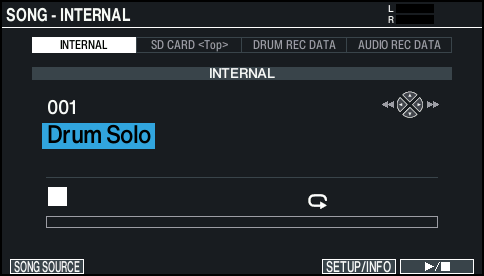
- Press the [F1] (SONG SOURCE) button to show the SONG SOURCE list, and press the [F1] (SELECT) button to select the type of song you want to play back.

Song type
Explanation
INTERNAL
Built-in songs
SD CARD<Top>
Songs stored on SD card
DRUM REC DATA
Songs for drum performance data recorded on this unit
AUDIO REC DATA
Songs recorded on this unit as audio data
- Move the cursor to the song, and use the [-] [+] buttons or the dial to select the song.
- Press the [ò] button.
- The selected song plays.
MEMO
You can also play/stop using the [F6] (ò) button.
Controller | Function |
[ò] button, [F6] (ò) button | Plays/stops the song (*1) |
[SHIFT] button + [Í] button | Returns to the beginning of the song (*1) |
[SHIFT] button + [Ë] button | Moves to the end of the song (*1) |
[Í] button | Rewinds the song (*1) |
[Ë] button | Fast-forwards the song (*1) |
Dial | Fast-forwards/rewinds the song (*1, *2) |
[BACKING] knob | Adjusts the song (audio file) volume (*3) |
- : Depending on the type of song, this might be disabled.
- : Only enabled when the cursor is on the seek bar (the bar that shows the playback position).
- : It does not affect the drum performance sound of the built-in songs or the recorded drum sounds.
MEMO
- You can repeatedly play back an entire song or just one part.
- You can make the click sound in time with the song by outputting an audio file on the SD card as a click track.
Ø “Playing back an audio file as a click (Click Track)”