Recording audio (AUDIO REC)
Here’s how to record your performance as audio data (WAV).
NOTE
When recording in AUDIO REC mode, the recorded data is erased once you exit the AUDIO REC PLAYBACK screen after recording is finished.
Before you proceed, you should save any important data to your SD card.
- Press the [ó] button.
- The REC screen appears, and the unit enters record-standby mode.
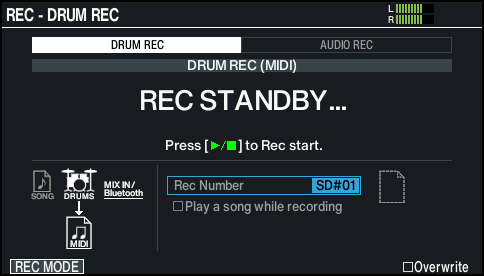
MEMO
If you want to record along with the click, make the click play.
Ø “Using the Click”
- Press the [F1] (REC MODE) button to show the REC MODE window.
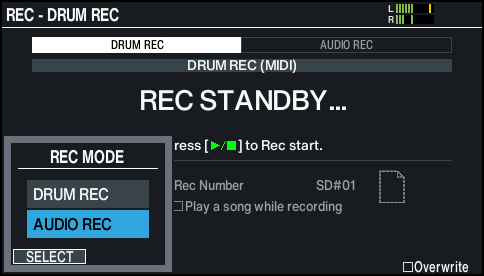
- Use the cursor [É] [Ç] buttons or the dial to select “AUDIO REC”, and press the [F1] (SELECT) button.
- The REC - AUDIO REC screen appears.
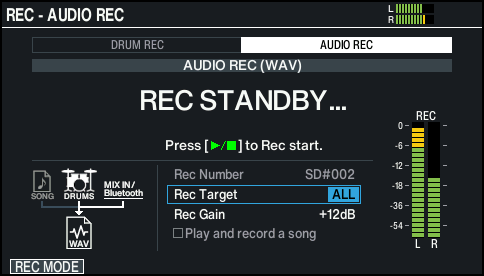
- Use the cursor buttons and the dial to change the recording settings.

Parameter
Value
Explanation
Rec Number (*1)
TEMPORARY
Records to temporary memory on this unit. Up to approximately one minute can be recorded.
- This is selected when an SD card is not inserted in the V51.
SD#001–200
Records to an SD card. Up to approximately 60 minutes can be recorded.
- This is selected when an SD card is inserted in the V51.
Rec Target
ALL
The input audio from the MIX IN (STEREO) jack and the playback audio from a smartphone connected via Bluetooth is recorded, in addition to your drum playing.
DRUMS ONLY
Only your drum playing is recorded.
Rec Gain
-24 – +24dB
Adjusts the recording level.
Before you start recording, make adjustments while checking the level meter.
- *1: Rec Number is set automatically.
- Press the [ò] button to start recording.
- Press the [ò] button to stop recording.
- The AUDIO REC PLAYBACK screen appears.
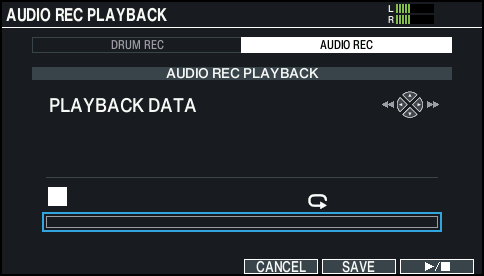
- Press the [ò] button to start playback.
- The recorded performance plays back.
- Press the [ò] button to end playback.
MEMO
You can also play/stop using the [F6] (ò) button.
- If you don’t want to save the recorded data, press the [F4] (CANCEL) button to exit recording.
- To save the recorded data, press the [F5] (SAVE) button.
- A confirmation message appears.
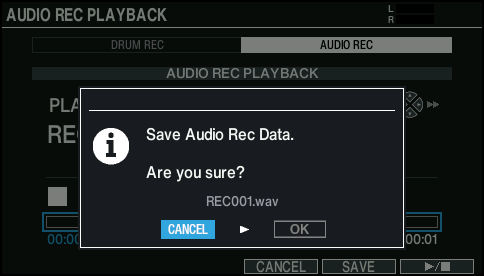
- If you decide to cancel, select “CANCEL” and press the [ENTER] button.
- Select “OK” and press the [ENTER] button.
- This saves the recorded data to the SD card.
MEMO
You can also record your drum playing along with a song.