Assigning a user sample to an instrument and playing it
- Press the [INSTRUMENT] button.
- * If the INSTRUMENT - VOLUME window is displayed, press the [F4] button to display the INSTRUMENT window.
- Select the pad to configure.
- Ø “Selecting the pad to set”
- Press the [ENTER] button.
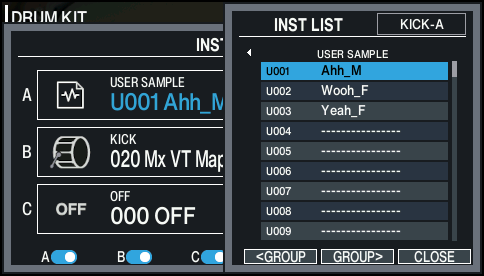
- The INST LIST window appears.
- Use the [F5] (GROUPæ) button to select the “USER SAMPLE” instrument group, and use the cursor [á] [à] buttons to select the user sample.
- Press the [F6] (CLOSE) button.
- Press the [KIT] button to return to the KIT screen.
- When you strike the pad to which the user sample is assigned, you hear that user sample.