Organizing user samples
Here’s how to renumber the user sample numbers or optimize the user sample area.
- On the USER SAMPLE LIST screen, press the function buttons to access the respective settings screens.

Button
Explanation
[F3] (RENUMBER) button
Renumbering user samples to eliminate blanks (RENUMBER)
If you repeatedly import and delete user samples, the numbers will become discontinuous.
This function lets you shift (renumber) the user samples forward to remove any blank sample memories. The user sample assignments for drum kits are also updated so that they will sound correctly.
- If you executed RENUMBER, and then load previously-saved backup data or kit backup data (that does not include user samples), the user samples assigned to the drum kit will no longer be correctly reproduced.
[F4] (OPTIMIZE) button
Optimizing the user sample area (OPTIMIZE)
If you repeatedly import and delete user samples, the user sample area might become fragmented, reducing the number of user samples that can be loaded.
This function optimizes the area so that user samples can be loaded.
NOTE
- Be sure to back up your data before executing this function.
Ø “Backing up your data (BACKUP)”
- This process might take more than an hour in some cases (depending on the number and size of the user samples).
- Never turn off the power while this operation is in progress. If you turn off the power, your user samples might be lost.
- In some cases, optimizing might not produce results.
[F5] (DELETE) button
Deleting a user sample (DELETE)
This deletes samples in user memory.
Press the [F5] (CHECK) button to select the check boxes of the user samples you want to delete.
Press the [F4] (CHECK ALL) button to select the check boxes of all user samples.
Press the [F6] (DELETE) button to carry out the deletion.
NOTE
All user samples used in drum kits are also deleted. Pads to which a user sample is assigned will no longer produce sound.
- A confirmation message appears.
- Example: when using OPTIMIZE
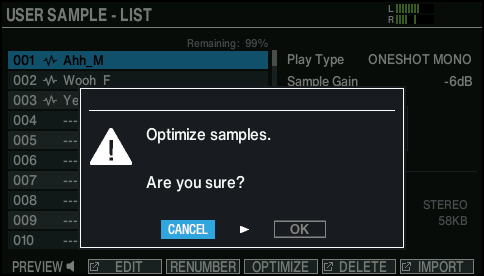
- If you decide to cancel, select “CANCEL” and press the [ENTER] button.
- Select “OK” and press the [ENTER] button.
- The selected function is executed.