Configuring various drum kit-related settings (KIT OTHERS)
Here’s where you can configure the various drum kit-related settings such as the V-Drum kit volume, controller LED color and so on.
ØFor details on the parameters that can be edited, refer to “Data List” (Roland website).
- Press the [KIT EDIT] button.
- Press the [F5] (OTHERS) button.
- The KIT OTHERS screen appears.
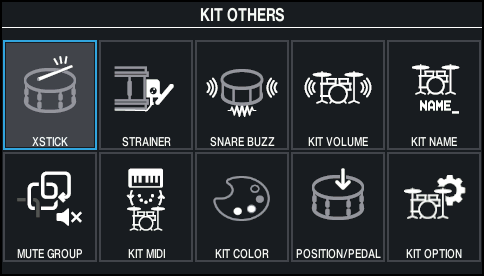
- Use the cursor buttons or the dial to select the menu that you want to edit, and press the [ENTER] button.

Menu
Explanation
XSTICK
Sets the cross-stick volume.
STRAINER
Configures the strainer settings.
SNARE BUZZ
Sets the resonance that’s applied to the snare.
KIT VOLUME
Sets the drum kit volume.
KIT NAME
Edits the name of the drum kit.
MUTE GROUP
Sets the mute group.
KIT MIDI
Configures the MIDI-related settings for the drum kit.
KIT COLOR
Sets the LED color for the buttons and dial.
POSITION/PEDAL
Adjusts the on/off setting for the change in sound according to the strike point or rim shot; the strike point area; and the amount that the pitch changes according to how hard you press the hi-hat pedal.
KIT OPTION
Sets the brush, drum kit tempo, KIT screen view and so on.
- Edit the settings according to the selected menu.
- Edit the drum kit settings.
- Press the [KIT] button to return to the KIT screen.
Additional information
- Configuring the cross stick (XSTICK)
- Configuring the strainer
- Configuring the resonance of the snare (SNARE BUZZ)
- Setting the drum kit volume (KIT VOLUME)
- Renaming the drum kit (KIT NAME)
- Muting the sound of a specific pad when you strike a pad (MUTE GROUP)
- Making MIDI transmit/receive settings for each pad (KIT MIDI)
- Setting the colors for the buttons and dial (KIT COLOR)
- Controlling tonal change (POSITION/PEDAL)
- Configuring the drum kit-related settings (KIT OPTION)