Loading Instrument Expansions/Kit Packs in a rack into a slot (LOAD TO SLOT)
This shows how to load an Instrument Expansion/Kit Pack installed in the rack into a slot.
Here’s how to import a drum kit from an Instrument Expansion.
The drum kits in the Kit Packs can also be loaded using the same steps.
- On the RACK screen, select the Instrument Expansion to load into a slot.
- * Instrument Expansions already loaded into a slot can’t be loaded into a different slot.
- Press the [F4] (LOAD TO SLOT) button.
- The LOAD TO SLOT window appears.
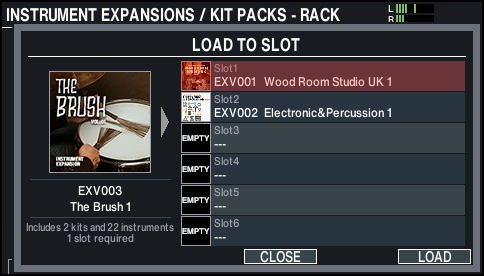
- If you decide to cancel, press the [F4] (CLOSE) button.
- Use the [-] [+] buttons or the dial to select the load destination slot, and press the [F6] (LOAD) button.
- This loads the Instrument Expansion.
- * When you select a slot in which a different Instrument Expansion has already been loaded, a confirmation message appears. Select “OK” and press the [ENTER] button to overwrite.
- * You can’t load a single Instrument Expansion into multiple slots. If an Instrument Expansion is already loaded into a different slot, the slot number that’s loaded is shown.
- Press the [ENTER] button to finish the operation.