Removing an Instrument Expansion/Kit Pack assignment (REMOVE)
This shows how to remove an Instrument Expansion/Kit Pack loaded into a slot.
The explanation here shows the steps for removing an Instrument Expansion.
The drum kits in the Kit Packs can also be removed using the same steps.
NOTE
When you remove an Instrument Expansion or Kit Pack, the drum kits that include that Instrument Expansion or Kit Pack can no longer be correctly recreated.
To recreate the drum kit, reload the necessary Instrument Expansions/Kit Packs again into the slots.
- On the SLOT screen, select the Instrument Expansion to remove from the slot.
- Press the [F5] (REMOVE) button.
- A confirmation message appears.
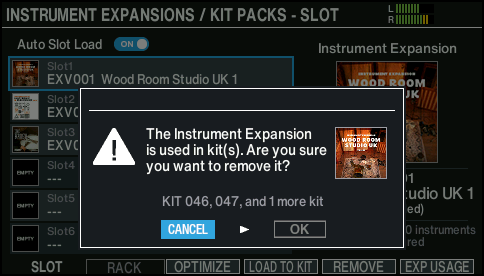
- If you decide to cancel, select “CANCEL” and press the [ENTER] button.
- Select “OK” and press the [ENTER] button.
- This removes the Instrument Expansion from the slot.
- Press the [ENTER] button to finish the operation.
Viewing the kits that use Instrument Expansions/Kit Packs
This is useful for checking which kits are affected if you swap the Instrument Expansions/Kit Packs in a slot.
- On the SLOT screen, press the [F6] (EXP USAGE) button.
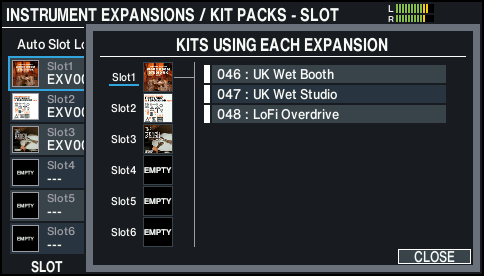
- The kits that use the Instrument Expansions/Kit Packs assigned to the respective slots are shown as a list.
- Press the [ø] button to move the cursor to the kit list and then press the [F5] (SELECT) button to switch between kits.