Assigning a function to a footswitch
Connecting an FS-5U
- If you use a mono cable to connect a single FS-5U, it operates as SW2.
- The FS-5L cannot be used.
Connecting an FS-6
- Press the [SETUP] button.
- Use the cursor buttons to select “CONTROL SETUP”, and press the [ENTER] button.
- Press the [F1] (FOOT SW) button.
- The CONTROL SETUP - FOOT SW screen appears.
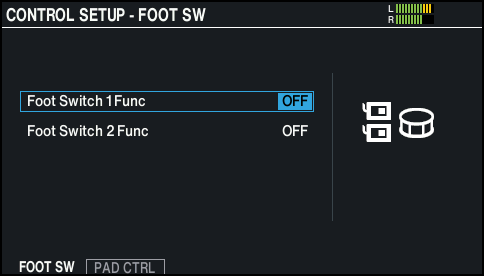
- Use the cursor buttons to select a parameter, and use the [-] [+] buttons or the dial to edit the value.
MEMO
If you want to switch between drum kits in the set list with a footswitch, set the footswitch’s assigned function to “KIT# DEC” or “KIT# INC”, and turn the set list on (Make the set list settings in advance.)
- Press the [KIT] button to return to the KIT screen.