Other settings (OPTION)
This shows how to configure the settings for the [PREVIEW] button, the MIX IN jack, Bluetooth audio, the display and so forth.
MEMO
For details on the parameters that can be edited, refer to “Data List” (Roland website).
- Press the [SETUP] button.
- Use the cursor buttons to select “OPTION”, and press the [ENTER] button.
- The OPTION screen appears.
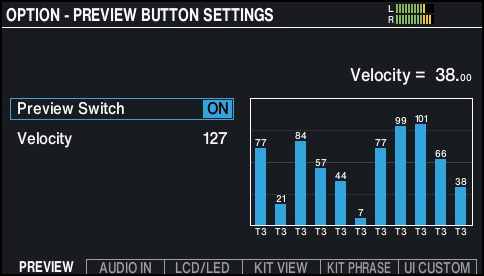
- Press the [F1] (PREVIEW)–[F6] (UI CUSTOM) buttons to select the item you want to edit.

Button
Explanation
[F1] (PREVIEW) button
Sets how the sound plays when you press the [PREVIEW] button.
[F2] (AUDIO IN) button
Sets the signal volumes for the MIX IN jack and Bluetooth audio.
[F3] (LCD/LED) button
Adjusts the brightness of the display as well as the buttons and dial.
[F4] (KIT VIEW) button
Configures the background and text size for the KIT screen.
[F5] (KIT PHRASE) button
Enables/disables the kit phrase function.
[F6] (UI CUSTOM) button
Sets whether the virtual pads are displayed on the screen.
- Use the cursor buttons to select a parameter, and use the dial to edit the value.
- Press the [KIT] button to return to the KIT screen.