Checking whether the instruments included in an Instrument Expansion or Kit Pack are being used
You can check whether the instruments included in the Instrument Expansion or Kit Pack are being used in the selected kit. This is useful when swapping between slots.
- Access the INSTRUMENT screen.
- Hold down the [SHIFT] button and press the [4] (EXP INFO) button.
- The Expansions Assign Info window opens.
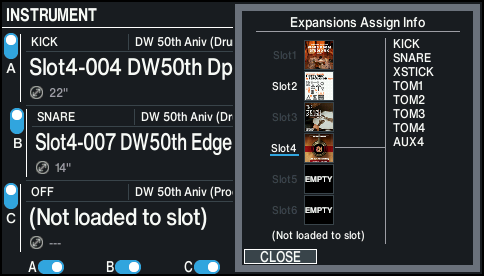
- Use the cursor [á] [à] buttons or the dial to select the slot you want to check, or select “Not loaded to slot”.