Example: settings for the VH-10
- With the hi-hat completely separated from the motion sensor unit, turn the unit on.
- Loosen the clutch screw of the VH-10 so that the hi-hat rests naturally on the motion sensor unit.
- Press the [SETUP] button.
- Use the cursor buttons to select “TRIGGER”, and press the [ENTER] button.
- Press the [F4] (HI-HAT) button.
- The TRIGGER - HI-HAT screen appears.
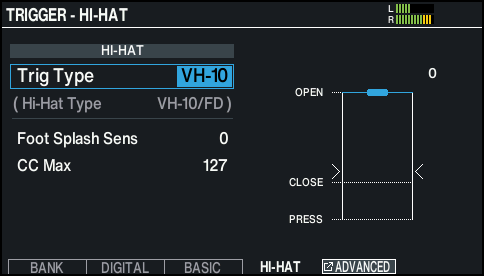
- Use the [-] [+] buttons or the dial to set the Trig Type to “VH-10”.
- While reading the meter displayed on the right side of the screen, adjust the offset with the VH-10’s offset adjustment screw.
- Adjust the offset so that the Ë Í marks appear on the meter.
- Tighten the clutch screw at a position where the hi-hat sways naturally when struck.
- Press the [KIT] button to return to the KIT screen.
- Make detailed adjustments to the parameters as necessary.
- Ø“Data List” (Roland website)