3. Configuring the DWe pad assignment
This shows how to specify the trigger input to which a connected DWe pad should be assigned.
The optimal assignments are already made when you first connect each pad. The following explains how to change the assigned destinations (assignments).
- Access the DrumLink - HUB screen.
- Press the [F2] (BASIC) button to display the DrumLink - TRIGGER BASIC screen.
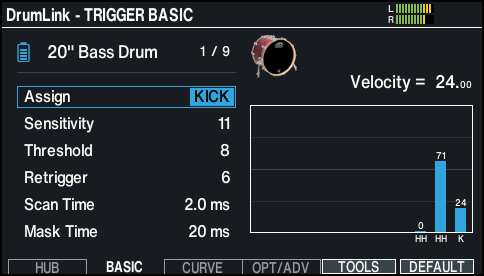
- Strike to select the DWe pad that you want to set.
- You can also use the cursor buttons to move the cursor to the position shown in the illustration, and use the [-] [+] buttons or the dial to select the DWe pad to set.
- Use the cursor buttons to select the Assign parameter.
- Use the [-] [+] buttons or the dial to change the assignment.