Setting the drum kit volume (KIT VOL)
Here’s how to set the volume of the drum kit, the hi-hat and so on.
Ø For details on the parameters that can be edited, refer to “Data List” (Roland website).
- Press the [KIT EDIT] button.
- Use the cursor buttons to select “KIT VOL”, and press the [ENTER] button.
- The KIT VOLUME screen appears.
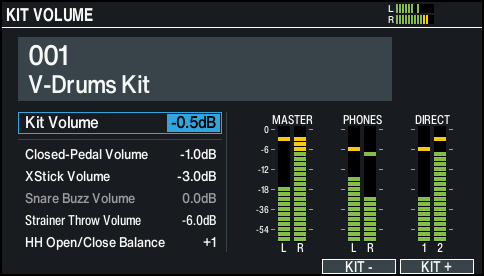
- Use the cursor buttons to select a parameter, and use the dial to edit the value.

Parameter
Value
Explanation
Kit Volume
-INF–+6.0dB
Drum kit volume
Closed-Pedal Volume
Pedal hi-hat volume
XStick Volume
Cross-stick volume
Snare Buzz Volume (*1)
Snare resonance volume
Strainer Throw Volume
Volume of the sound that’s heard when the strainer lever is raised or lowered
HH Open/Close Balance
-5–+5
Balance between open and close volume
Lower values decrease the volume of the hi-hat when played while open, relative to the volume when played while closed. Higher values increase the volume of the hi-hat when played while open, relative to the volume when played while closed.
[F5] (KIT -) button
[F6] (KIT +) button
Switches between drum kits to set.
This is useful when you want to check the volume for each drum kit.
- *1: Enabled when the Buzz Switch of SNARE BUZZ is “ON”.
- Press the [KIT] button to return to the KIT screen.