Playing accurately along with phrases (PHRASE TRAINER)
This is a mode where you practice playing exactly along with the phrase.
The V51 includes a variety of phrases that you can use for practice.
- Press the [SONG] button while holding down the [SHIFT] button.
- Use the cursor buttons or the dial to select “PHRASE TRAINER” and press the [ENTER] button.
- Select the phrase to practice.
- Select a category: press the [Í] [Ë] buttons or the [F1] (CATEGORY) button
- Select a phrase: press the [É] [Ç] buttons or use the dial

Category
Explanation
Exercises
Phrases suitable for practicing the basics.
Grooves & Fills
These phrases are suitable for practicing rhythm patterns and fills.
MEMO
- You can press the [F4] (PREVIEW) button to preview the selected phrase.
- By pressing the [F3] (SETUP) button, you can select which drum kit to play the phrase on, and which marks are used to show the results.
- Press the [F5] (CLICK) button to make click settings.
Ø “Using the Click”
- Press the [F6] (START) button.
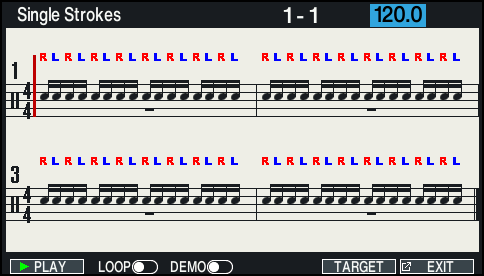
- The score of the phrase is shown.
MEMO
- When playback is stopped, press the [F2] (LOOP) button to turn playback on and practice the phrase repeatedly (loop play).
- To play a demo of the phrase during playback, press the [F3] (DEMO) button to turn it on. The pads you play are muted during demo playback.
- Press the [F5] (TARGET) button to select the pad to practice on.
- You can use the dial to change the practice tempo.
- Press the [F1] (ø PLAY) button to start recording.
MEMO
- To stop during practice, press the [F1] (ð STOP) button.
- You can also play/stop using the [ò] button.
- Play the pad in time with the phrase.
- After the phrase finishes, the result of how accurately you played the phrase is shown.
- The result is not shown when you’re playing in a loop.
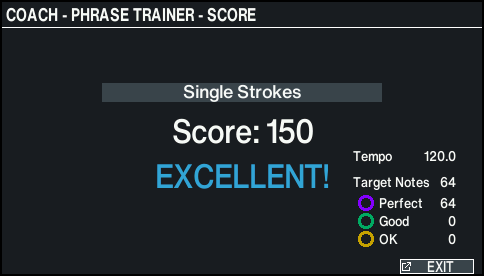
- Press the [F6] (EXIT) button to finish.