Playing at a fixed velocity (STROKE MONITOR)
This mode lets you practice playing the pads at a constant velocity, by checking how hard you strike the pads.
Use this when you want to check the difference in how hard you play with your left and right hands, or the difference in how hard you play twin pedals with your left foot and right foot.
- Press the [SONG] button while holding down the [SHIFT] button.
- Use the cursor buttons or the dial to select “STROKE MONITOR” and press the [ENTER] button.
- The COACH - STROKE MONITOR screen appears.
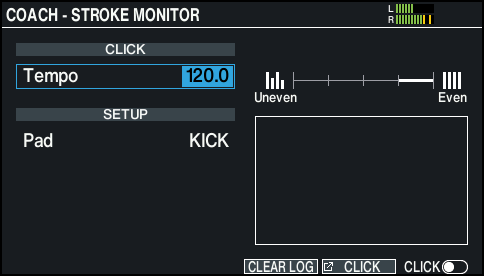
- Use the cursor buttons and the dial to change the practice settings.

Parameter
Value
Explanation
Tempo
20.0–260.0
Specifies the click tempo.
If you want a click to sound, press the [F6] (CLICK) button.
Pad
Selects the pad used for practice.
MEMO
Press the [F5] (CLICK) button to make click settings.
Ø “Using the Click”- Strike the pad so that you maintain about the same velocity.
MEMO
You can clear the display by pressing the [F4] (CLEAR LOG) button.