Updating the V51 via Wi-Fi
The V51 can be updated via Wi-Fi.
When the unit is connected to Wi-Fi, a message appears that notifies you of the latest program.
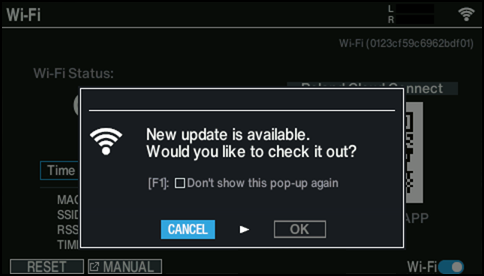
- Press the [F1] button to prevent update messages from being shown in the future. If you want to show these messages again, select the “Pop-up Notification for Updates” checkbox on the the SYSTEM INFO - VERSION screen.
- Even after you have closed the update message or if you’ve set the messages to not be displayed, “Update Available” is shown on the SYSTEM INFO - VERSION screen whenever a new program is available. Press the [F1] button while holding down the [SHIFT] button to update.
- Select “OK” and press the [ENTER] button.
- The new program version is shown.
- You can check the program update details by scanning the 2D code shown onscreen.
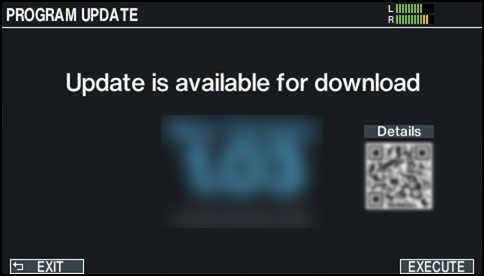
- Press the [F6] (EXECUTE) button.
- A confirmation message appears.
- If you decide to cancel, select “CANCEL” and press the [ENTER] button.
- Select “OK” to start downloading the new program. It may take 15 minutes or more for the download and update process to finish.
- Select “OK” and press the [ENTER] button.
- The program begins downloading.
- Once “Download Completed” is shown, the download is finished.
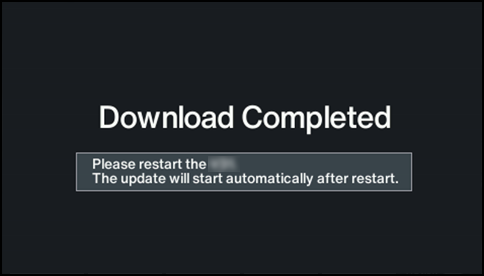
- Turn the power off, then on again.
- Turn the unit off and on again to automatically begin updating.
- * Be sure not to turn off the power while the unit is updating.