Playing the click track along with the song
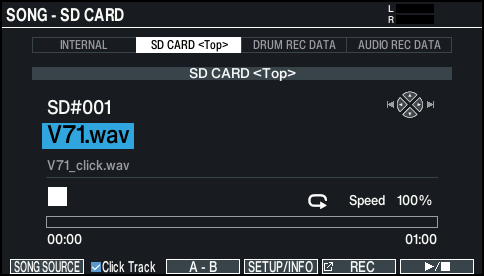
- On the SONG screen, press the [F1] (SONG SOURCE) button and select “SD CARD<Top>” for the SONG SOURCE.
- Ø “Playing along with the songs on the V71”
- Use the [-] [+] buttons or the dial to select the song that you want to play back along with the click track.
- In the example above, select the song “V71.wav”.
- Press the [F2] button and select the “Click Track” check box.
- Press the [ò] button.
- The click track plays back together with the song.
- To adjust the click track volume, turn the [CLICK] knob.
- In the example above, use the [SONG] knob to adjust the volume of “V71.wav”, and use the [CLICK] knob to adjust the volume of “V71_Click.wav”.
- To mute the click track, press the [F2] button and deselect the “Click Track” check box.
- You can also output the click track only to headphones.
Ø “Audio output assignments (OUTPUT)”