Editing the mixer (MIXER)
Here’s how to set the volume, pan and other effects for each pad or drum kit.
Ø For details on the parameters that can be edited, refer to “Data List” (Roland website).
- Press the [MIXER] button.
- Press the function buttons to access the respective settings screens.

Screen
Explanation
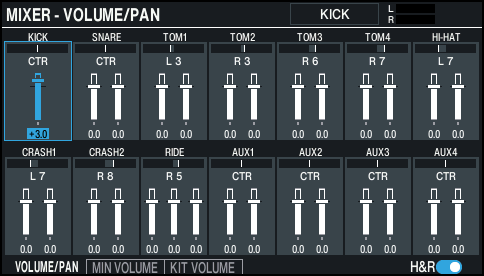
VOLUME/PAN screen
Sets the volume and pan for each pad.
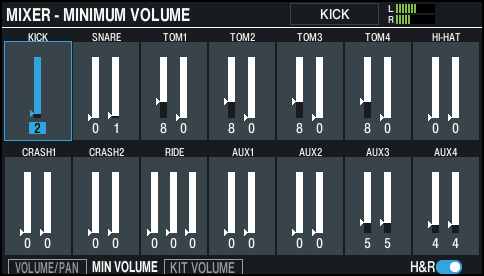
MINIMUM VOLUME screen
Sets the minimum volume of each pad.
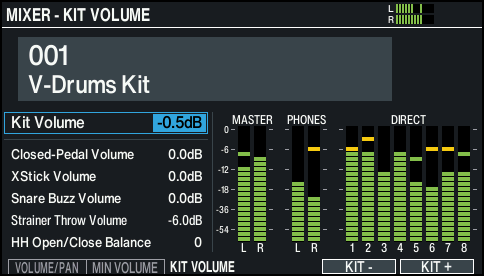
KIT VOLUME screen
Sets the drum kit volume.
- Select the pad to configure.
- Ø “Selecting the Pad to Set”
- You can also select using the cursor buttons.
- Use the cursor buttons to select a parameter, and use the [-] [+] buttons or the dial to edit the value.
Parameter
Value
Explanation
VOLUME/PAN screen
Volume
-INF–+6.0dB
Volume of each pad
Pan
L30–CTR (CENTER)–R30
Stereo position of each pad
MINIMUM VOLUME screen
Min Volume
0–15
Minimum volume of each pad
This brings up the volume of the softest hits while maintaining the volume on the strongest hits. This can make it easier to hear ghost notes on the snare or legato notes on the ride cymbal.
KIT VOLUME screen
Kit Volume
-INF–+6.0dB
Drum kit volume
Closed-Pedal Volume
Pedal hi-hat volume
Xstick Volume
Cross-stick volume
Snare Buzz Volume (*1)
Snare resonance volume
Strainer Throw Volume
Volume of the sound that’s heard when the strainer lever is raised or lowered
HH Open/Close Balance
-5–+5
Balance between open and close volume
Lower values decrease the volume of the hi-hat when played while open, relative to the volume when played while closed. Higher values increase the volume of the hi-hat when played while open, relative to the volume when played while closed.
[F5] (KIT -) button
[F6] (KIT +) button
Switches between drum kits to set.
This is useful when you want to check the volume for each drum kit.
- *1: Enabled when the Buzz Switch of SNARE BUZZ is “ON”.
- Press the [KIT] button to return to the KIT screen.
MEMO
- Pressing the [F6] (H & R) button to switch this “ON” lets you make simultaneous settings, such as both the head and the rim.
- You can also change the “Kit Volume” from KIT OTHERS.
Ø “Editing a drum kit (KIT OTHERS)” - The MIXER VOLUME/PAN settings can be copied.
Ø “Copying settings (COPY)”